Call recording
Recordings in Exovo stay on your hardware, are searchable from the console, and can carry consent prompts where the law requires them.
What gets recorded
- Every call is recorded per user — one setting, on the user, covers their calls whichever way they arrive: dialed direct, forwarded to them, placed by them, or answered from a queue or a ring group. For a queue or ring-group call the decision is made when somebody answers, from that person's own setting, so only the people who record are recorded; recording starts a moment after they pick up rather than while the caller is still on hold.
- Narrowing it down — on the user's Permissions tab, record external calls only, and choose a Direction: calls to and from the user, only calls to them, or only their outside calls. A call between two users follows the setting of the person being called.
- Never record calls with this user — also on the Permissions tab, for HR, legal or medical lines. It wins over every other setting: calls to and from that person are never recorded, not by their own setting, not by the other person's, not as a queue or ring-group answer, not by always record emergency calls, and the app's on-demand Record is refused.
- Who can see them — users with the Show recordings permission see their own recordings under Recordings in the web client and the apps. Without it the page says so — the calls are still recorded, the person just cannot see them.
- On demand — a Record control in the Exovo app starts and stops recording on the live call. Per-user recording permissions govern who can record and who can play back or delete their own recordings.
The recordings library
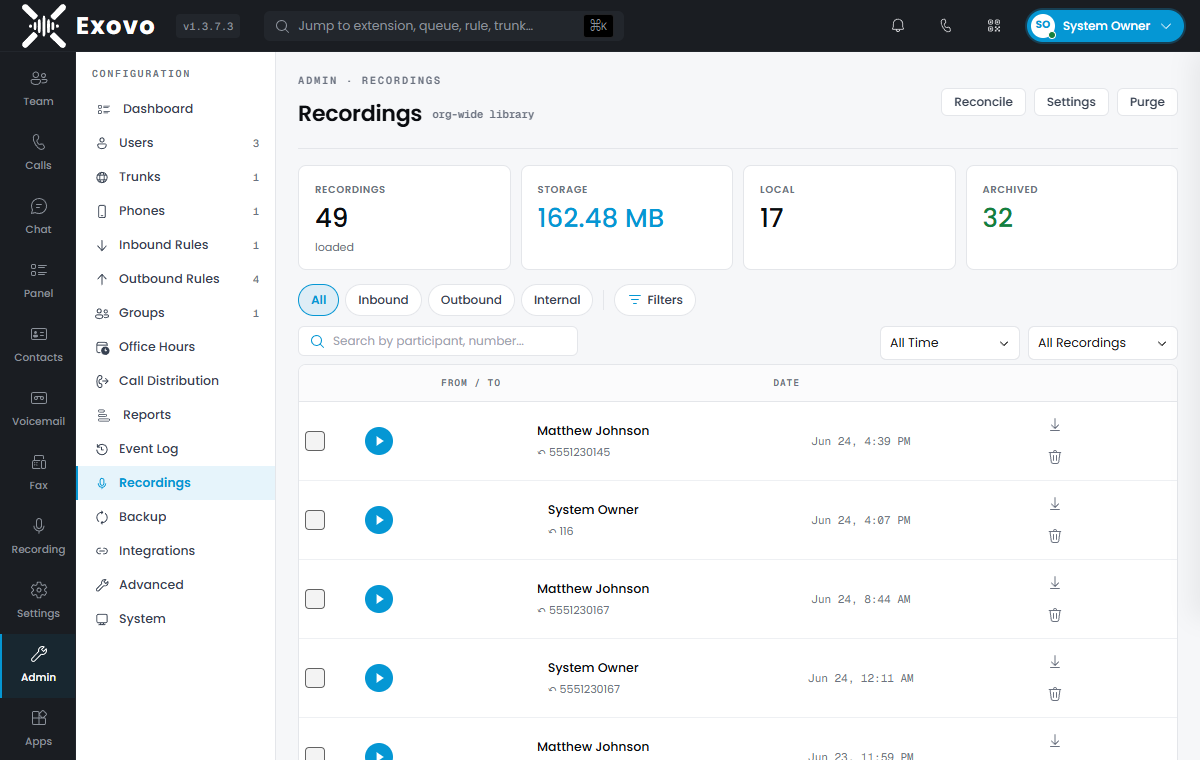
Admin → Recordings is the org-wide library: filter by direction (inbound/outbound/internal),
date range, participant or number, and local vs archived location. Each entry plays inline,
downloads as a .wav, or deletes; bulk selection covers archive and delete operations across a
filtered set.
Users' own Recordings page in the web client shows just the calls they were a party to, gated by their Show recordings permission; the org-wide library is Office › Recordings, an administrator view. A 3CX import carries each user's show and delete recording rights across.
Recordings elsewhere in the system
- CRM journaling can attach a signed, expiring playback link to the CRM contact's call record — see call journaling.
- Transcription turns recordings into searchable text.
- Storage and retention — quotas, archival to remote storage and auto-deletion are covered in storage and archiving.
Compliance notes
Consent rules for recording vary by jurisdiction (one-party vs all-party consent). Exovo does not play a consent prompt to the caller — if your jurisdiction requires one, put it in the queue's intro prompt or the user's greeting. Make sure internal policy covers the agent side, and use retention (auto-delete) to avoid keeping recordings longer than policy allows.
To record every emergency call, whoever makes it, tick Always record emergency calls under Settings on the Recordings page (see emergency calling).
Every play and download of a recording is in the audit log: who, when, from which address, and how (web client, Exovo app, a CRM note's link, or the public API). Playing a recording counts once, however much the listener skips around in it.